Industrial Tablet Aviation Connector and RJ45 Port
Quick answer: An aviation connector is a threaded circular connector taken from aircraft wiring practice, and it sits on an industrial tablet for three reasons: the coupling ring locks the cable in place, the mated pair seals on an O-ring, and the pin set is yours to define. The XH-400 carries two of them next to a covered RJ45 port, so a fixed workstation gets wired Ethernet from a standard patch lead while power and serial data run through connectors that do not let go when someone drags the tablet across a bench.
Most tablets answer the question "how do I connect this?" with more USB. On equipment that is mounted, washed down or driven, USB is the wrong answer, and the connector on the side of the housing is where that decision gets made.
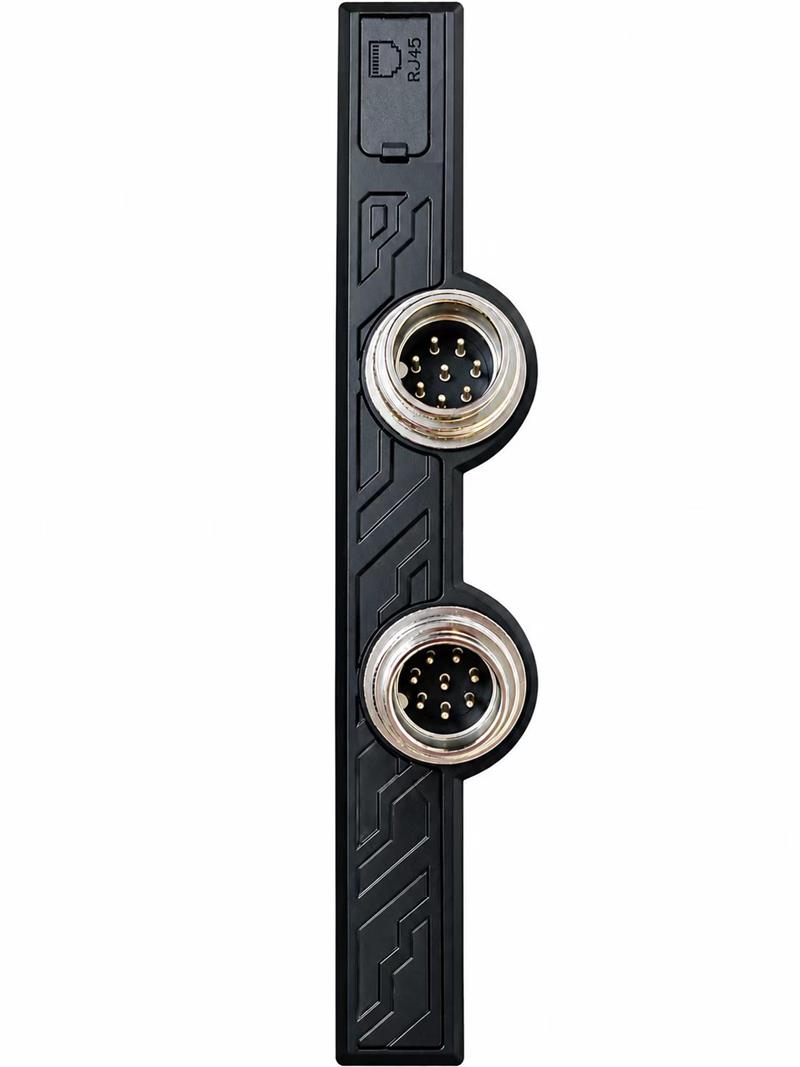
The XH-400 side panel: a covered RJ45 port above two threaded circular connectors. Pin assignment is drawn per project, so two tablets of the same model can be wired differently.
Where the name comes from
"Aviation connector" is the name the industry uses, not a standard. The family comes out of aircraft wiring, where a connector has to survive vibration, stay mated without a technician checking it, and keep moisture out of a bundle that carries power and signal together. The version that ended up on industrial equipment keeps the two features that matter: a threaded coupling ring, and a shell large enough to hold more pins than a sensor connector.
It is worth separating it from the two connectors it is often confused with. An M12 connector is an industrial sensor standard: small shell, a handful of pins on a fine thread, designed to be screwed on by hand at a sensor. A push-pull connector locks with a spring latch and releases with a collar, which is faster but relies on a mechanism that grit can jam. The threaded type needs a couple of turns to seat, and that is exactly why it holds.
Why a sealed tablet does not just fit more USB
A USB socket is a friction fit. The plug is held by spring contacts and a light detent, which is fine on a desk and inadequate on a vehicle: a cable tugged at an angle walks the plug out, and the wear shows up as an intermittent connection long before the port fails outright. Adding a locking USB cable helps, and the lock is in the cable, so the next cable someone brings from the stores is unlocked again.
The circular connector moves that decision into the housing. It also changes what the port can carry, which matters more than the mechanical argument.
| Property | USB-A / USB-C | Threaded circular connector | What it means on site |
|---|---|---|---|
| Retention | Friction and a light detent | Coupling ring, several turns | A kicked cable does not disconnect the tablet |
| Sealing | Open cavity, plug has no seal | O-ring seals the mated pair | Can stay connected through a wash-down |
| Vibration | Contacts micro-move and wear | Preload holds the contacts still | No intermittent faults after months on a vehicle |
| Cable | Moulded assembly, fixed length | Made up on site to any length | Route through a cabinet or a mast without a joiner |
| Signals per shell | Four to twenty-four, fixed by the standard | Whatever you assign | Power, RS-485 and USB in one connector |
| Mistake-proofing | None, any port accepts any plug | Keyway and different pin counts | Two identical-looking connectors cannot be swapped |
| Cost | Low, replaceable anywhere | Higher, and the mating half is a part number | The trade is cable assemblies against downtime |
What actually goes through the pins
On a rugged tablet the assignment usually follows the equipment it is mounted to rather than the tablet's own feature list. The common groups are:
- Power in. A dedicated pair, thicker than the signal pins, feeding the tablet from the vehicle or cabinet supply instead of the internal pack.
- Serial. RS-232 or RS-485 to a PLC, a weighing indicator, a barcode decoder or a forklift controller. This is the single most common reason to ask for a circular connector at all, because a USB-to-serial adapter on a moving vehicle is a failure waiting for a date.
- USB. One or two pairs brought out to a fixed scanner, keyboard or card reader that should not be unplugged.
- Discrete I/O. A trigger input, a relay output for a lamp or a door strike, or an ignition-sense line so the tablet powers up with the vehicle.
- Ethernet. Four twisted pairs inside the shell, when the installation needs a sealed link instead of an RJ45 jack.
All of that in one shell is the point. A tablet with four separate sealed ports has four places to leak; a tablet with one connector and one drawing has one.
RJ45 and the circular connector are not competing
The XH-400 has both, and the split is practical rather than decorative. The RJ45 port accepts a standard patch lead, which means a technician can replace a failed cable from a drawer at two in the morning. It cannot be sealed while a plug is in it, because the latch and contacts sit in an open cavity, so the port carries a cover and stays shut unless Ethernet is in use.
The circular connector is the opposite trade: it seals while mated, locks, and needs a made-up cable that nobody has on a shelf. So the rule that works in practice is:
- Fixed workstation, dry area, cable rarely touched: RJ45. Standard parts, cheap, replaceable.
- Vehicle, wash-down, mast or outdoor cabinet: Ethernet pairs through the circular connector, sealed and locked.
- Both on the same device: exactly what the XH-400 does, because the two situations turn up in the same fleet.
One mechanical note on the RJ45 in a moving installation: the latch is the weak point, and a thick Cat6 lead with a long stiff boot acts as a lever on the jack. A slim patch lead with a short boot lasts longer, and a strain-relief loop before the first cable tie removes most of the load.
What to put in the specification
- Both halves, with part numbers. The panel connector and the cable-end connector are separate parts. A quotation that names only one is incomplete.
- Pin count and pin gauge. Power pins need to be thicker than signal pins. State the voltage and current per pin rather than the total.
- Sealing, mated and unmated. Two different conditions. The mated pair is what the rating refers to; the cap is what protects the connector when nothing is plugged in.
- Keyway or different pin counts. If two connectors of the same shell size sit side by side, as on the XH-400, they must be mechanically impossible to swap.
- Shielding and earth. Matters for Ethernet and for long serial runs next to a motor drive. Ask where the shield lands, at the shell or at a dedicated pin.
- Cable and bend radius. State the length and the route. A connector rated for a tight bend does not save a cable that is bent tighter than its radius.
- Mating cycles and torque. If the connector is unmated daily, the thread and the plating wear. If it is mated once at installation, this line does not matter.
- Environment. Salt spray on a dockside vehicle, and low temperature in a cold store, change both the shell plating and the cable jacket.
The failures that show up later
In service, the connector itself is rarely what fails. What fails is the installation around it.
- Turned part of the way. The ring seats with a feel rather than a click, and a rushed fit leaves it a turn short. Water gets in at the thread, and the fault is reported as a failed tablet.
- Cable weight carried by the plug. A bundle tied off two feet away puts the whole load on the solder joints. Every connector needs its own strain relief close to the shell.
- Cap left off. An unmated connector with no cap collects dust and swarf. A tethered cap, not a loose one, is the only version that survives a year.
- Two leads swapped. Same shell size, same pin count, no keyway: the power lead goes into the serial port. This one is designed out, not trained out.
- Wrong cable jacket. A PVC lead in a cold store goes stiff and cracks at the gland; a lead without a flex rating work-hardens on a vehicle.
Where this configuration fits
The XH-400 is a 10.1-inch IP65 tablet with a 10,000 mAh pack, native RJ45 and the two circular connectors shown above. The combination suits a few specific situations: a forklift or AGV mount where the cable runs to a vehicle harness and nobody is going to re-plug it mid-shift; a production bench where the tablet talks RS-485 to a controller and Ethernet to the line network; a cold store or a wash-down area where an open RJ45 jack would collect moisture; and a mobile enrolment or verification point that is carried between rooms and docked at each one.
For a desk-mounted kiosk that never moves, the same tablet is over-specified. There the RJ45 alone is enough and the circular connectors stay capped, which costs nothing and keeps the option open.
If the assignment is not settled yet, the useful step is to send the signal list rather than the connector name: which device, which protocol, what voltage, what cable length, and how often it gets unplugged. That list decides the shell, the pin count and the keyway, and it is the document the factory draws from.
Send Us Your Signal List
Device, protocol, voltage, cable length and how often the connector gets unmated. We will come back with a pin assignment drawing and the mating part numbers, before any sampling starts.
Frequently Asked Questions
What is an aviation connector doing on a tablet?
Does the XH-400 charge through the aviation connector?
Is the RJ45 port on a sealed tablet actually waterproof?
Can the pinout be customised?
Can I use a normal Ethernet cable in the RJ45 port?
Will the connector stay mated under vibration?
Related reading: Industrial Tablet Buying Guide · IP65 vs IP67 vs IP68 · Warehouse Rugged Tablet Guide · XH-400 Specification